
Features
Built for what a service is actually like. On the right song quickly, even when the wifi is not cooperating.
Songs
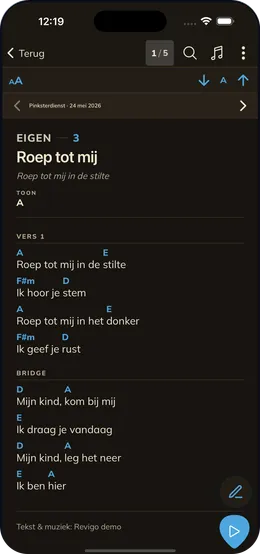
A song in Revigo is lyrics with the chords above them, in ChordPro. There are three ways to get songs in. You sign in with your Opwekking account and pull down the volumes you have bought. You search online for chords and import what you find. Or you type a song in yourself, which is useful for your own compositions and for anything that is in no songbook at all. Sheet music as a PDF can be added the same way. Everything you add lands on your device and stays there. Once a song has been saved, Revigo needs no connection to open it again. How it works with your Opwekking volumes.
-
Chords and lyrics
ChordPro rendering with chords above the words, or lyrics only when you are singing along.
-
Transpose and capo
Shift the key per song. The sounding key stays visible, capo included.
-
Your own songs
Add songs that are in no songbook. By hand, from a file, or through online search.
-
PDF songs
Got sheet music as a PDF? Add it, read it and annotate it.
Setlists
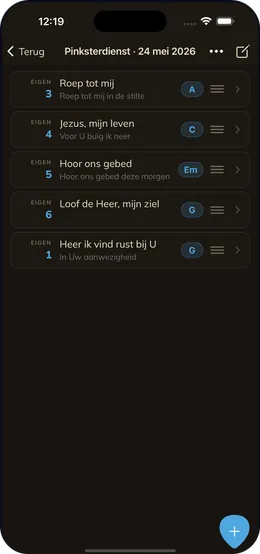
A setlist is the order you play in. The songs for Sunday morning, for the rehearsal or for a gig, with notes in between for the welcome, the prayer or a break. You drag songs into place and shuffle them until it reads right. While you are playing you swipe from song to song without going back to the list. The screen stays awake as long as you are working. Annotations you make on a song belong to that setlist and not to the song itself, so your markings for this Sunday do not clutter your ordinary sheet music. Building a setlist for a service, step by step.
-
Drag and reorder
Build the service in the order you want, with notes between songs for the welcome, prayer or a break.
-
Page through during the service
Swipe from song to song without going back to the list. The screen stays awake.
-
Annotations per setlist
Markings that belong to this Sunday rather than to the song itself.
-
Sharing
As a .revigo file, over Bluetooth to a device nearby, or to your team.
Team
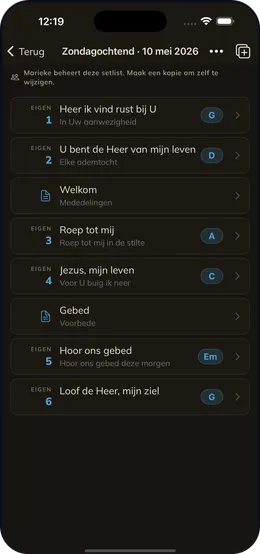
Revigo Team is for bands that would rather not forward the same list every week. When someone puts a setlist together it is there for every member: the order, the notes in between, the keys and the annotations. Everyone in the team can put setlists together, not only whoever took out the subscription. If several band leaders take turns, there is nothing to arrange for it and no second subscription to buy. Each setlist does have one owner: whoever makes it, runs it. Someone else sees it with your name on it and copies it to their own list if they want a version of their own. Songs you typed in yourself travel in full. Songs from a songbook such as Opwekking travel as a reference. Anyone with the same songbook sees them straight away. Anyone without it sees which songbook they are in and can sign in to Opwekking to fetch them. If the order or a key still changes on Saturday night, everyone plays the new version on Sunday. You invite your band members with a link, or with a code you read out at rehearsal. They type their name and play along, with no account and no cost. Team setlists work offline after that, like the rest of the app. You need a connection to fetch the list, not to use it.
-
One list for everyone
Team setlists reach every member. Changes follow automatically.
-
Invite with a code
Share a link or read the code out at rehearsal. Joining costs your band members nothing.
-
Several band leaders
Everyone in the team can put setlists together. One subscription covers them all.
-
Copy what you need
Whoever makes a setlist runs it. Someone else’s you copy to your own list and then change freely.
Revigo is free to try
Download the app and start with your own songs. A team can come later.